Visual Routine Trackers and Charts for ADHD Adults
Visual trackers bypass memory and motivation by replacing broken brain functions with external cues.
Most ADHD adults have lived through some version of the same cycle: a new planner, two weeks of discipline, then silence. The planner did not fail because of laziness or lack of willpower. ADHD does not erase the ability to plan or organize. It makes that ability inconsistent, because the brain systems that regulate planning, starting tasks, sequencing steps, and holding attention do not run the same way twice, and the gap between forming an intention and acting on it keeps opening and closing without warning.
Three failure modes produce most of this collapse. The first is time blindness: the internal sense of how much time has passed or remains is unreliable, so a deadline becomes a surprise and a transition between tasks turns into a small emergency. The second is working memory failure, where a task or an intention disappears between the moment it forms and the moment it needs to happen, because the system holding that information does not hold it reliably. The third is initiation difficulty, where even a simple task feels impossible to begin, because the pathway that turns intention into movement does not switch on when it is supposed to.
A 2025 study published through PubMed Central found that 82% of adult ADHD participants reported frequent difficulty with decision-making, and decision paralysis correlated strongly with executive dysfunction scores, predicting reduced life satisfaction and higher perceived stress. That is a structural outcome of how the ADHD brain processes competing demands, not a trait of someone's personality. Faced with an open-ended to-do list or a morning with no external structure, the ADHD brain runs into several demands at once, cannot rank them, and locks up, a pattern often called ADHD paralysis. Every tool discussed later in this piece exists to interrupt that lockup before it starts.
What visual tools do when a list or calendar fails
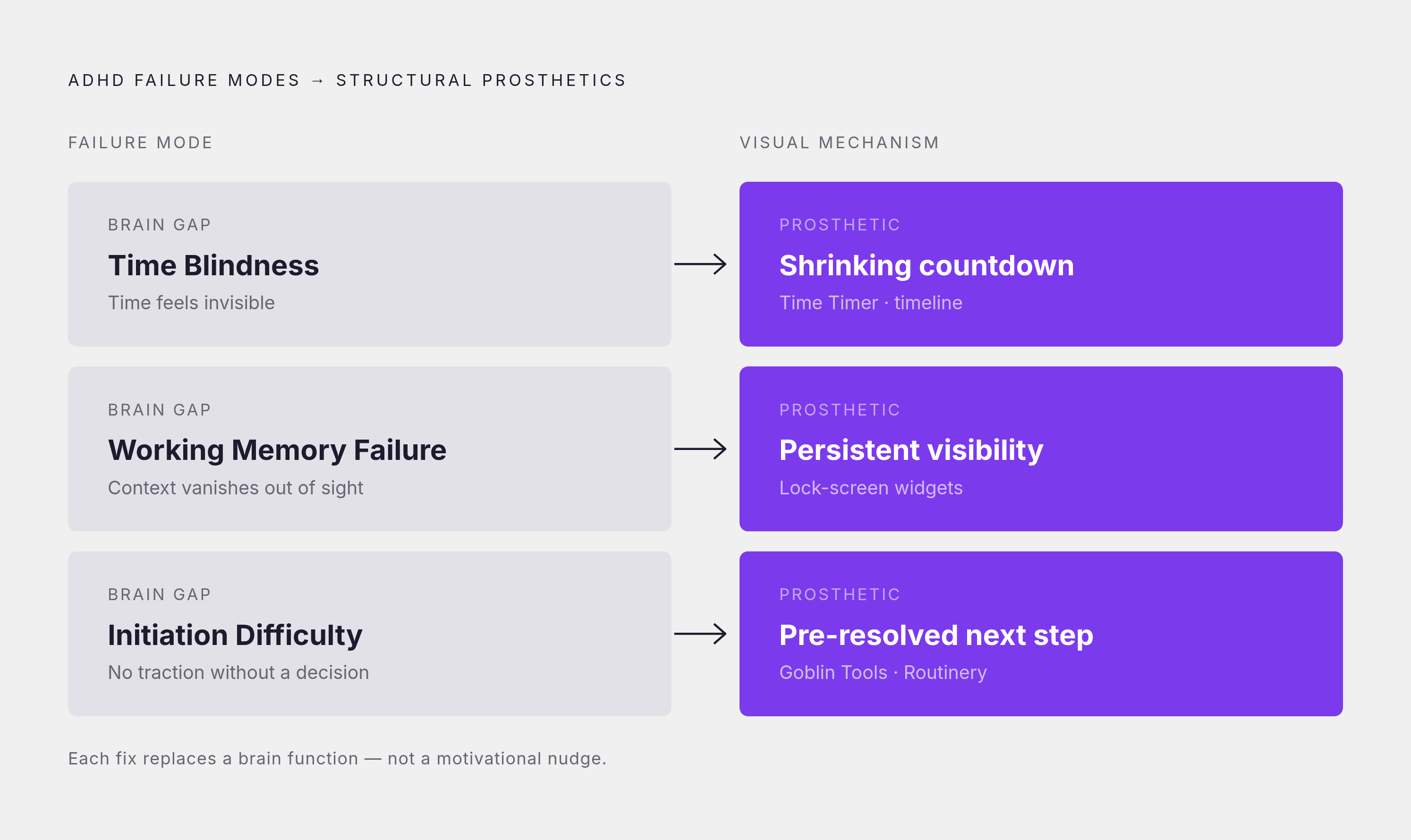
A visual tracker is not a prettier to-do list. It earns its place because it takes over a cognitive function the brain is failing to run on its own. A chart, a timeline, or a countdown does not motivate in the way a poster with a slogan might motivate. It performs the job directly, standing in for the part of the brain that was supposed to do that job and didn't. Call it a prosthetic for executive function rather than a productivity aesthetic.
Against time blindness, a visual timeline or a color-coded block makes the passage of time something a person can see rather than something they have to sense. The Time Timer, for instance, turns a countdown into a shrinking visual field, a design described as clinically studied and more intuitive for time-blind brains than a standard alarm or a numeric display. The reason it works where a clock doesn't is simple: an hour that is visibly shrinking carries information an internal clock can't reliably supply, and that information doesn't depend on the brain being in a good state that day.
Against working memory failure, the fix is persistence rather than memory. If a task sits visibly in the environment, the brain does not need to hold onto it, because the chart is holding it instead. Pretty Progress builds around exactly this principle: countdowns and progress bars live on a phone's Home Screen and Lock Screen, so the cue reaches the person without requiring them to remember to go looking for it. That is passive visibility standing in for active recall, and the distinction matters because active recall is precisely the function that fails.
Against initiation difficulty, a visual chart removes a decision rather than adding motivation. When the next step is already visible and unambiguous, the brain does not have to generate it, and generating that step was usually what kept the person from starting. A chart that shows "step two" instead of asking "what's next?" short-circuits the freeze, because the freeze was a decision problem more than a willpower problem.
One might ask why a simple written list doesn't do the same thing. A list holds information, but it does not make time visible, it does not stay in front of the eyes without being sought out, and it does not resolve the next-step question on its own.
Choosing the right format, paper, app, or hybrid, based on what is failing
The right format is not a matter of taste.
Paper and printable systems solve a problem that digital tools cannot touch by design: opening an app requires the initiation capacity the routine exists to support. A physical chart taped to a wall or sitting on a desk is already open. It requires no unlock, no navigation, no loading screen standing between the person and the first step. Printable routine card systems sold on platforms like Etsy occupy this niche directly, built for adults with executive dysfunction who need something already present in the physical environment rather than something they have to go find. Undated paper planners, such as those made by Clever Fox, solve a related but separate problem: because there is no date printed on the page, a person who abandons the system for a week or a month can pick it back up without wasted pages and without the shame of missed entries staring back at them.
Digital apps solve a problem paper cannot solve, which is interruption. An app can push a notification at the exact moment a block of time ends, or surface a widget that appears without being sought out, reaching into a moment that a static page has no way to reach. That advantage is real but limited in current practice. Only 12% of recommended apps in a 2025 survey cited through a background summary from Lunatask supported native widget integration. Most digital tools still ask a user to open the app and look, even when the whole premise of the fix is that looking is the hard part.
That gap is why hybrid setups turn up repeatedly among people who have tried both formats and kept parts of each: a physical card taped next to the coffee maker for the morning routine, paired with a phone reminder for a mid-afternoon transition. A single format rarely covers an entire day, because the failure mode in the morning is often different from the one that occurs later.
Major visual tracker tools
What follows is a tool-by-tool look at where each one fits, organized around the mechanism it addresses rather than around marketing claims. Habi publishes the 2026 roundup cited for several of the ratings below, since this piece draws on that roundup for product details.
Structured, available on iOS, Android, Mac, and Web, runs free or $6.49 a month and carries a 4.7-out-of-5 rating in Habi's 2026 roundup. It merges calendar events, to-dos, routines, and habits into a single visual timeline, directly answering time blindness by making the full shape of a day visible at a glance rather than scattered across separate screens. Over 1.5 million people actively use it, and the ADHD community in particular has adopted it because the timeline turns an abstract schedule into something spatially readable. It fits best for someone whose main struggle is time blindness and switching between contexts, someone who needs to see when things happen.
Goblin Tools, on iOS, Android, and Web, runs free on web or $1.99 on iOS and $3.49 on Android, rated 4.8 out of 5 in the same roundup. Its "Magic ToDo" feature uses AI to break one overwhelming task into smaller subtasks instantly, with an adjustable "spiciness" level controlling how granular the breakdown gets. That function goes straight at initiation difficulty, shrinking the first step until it is small enough that starting no longer feels like a wall. It is free on web with no sign-up required, and it was built specifically with neurodivergent brains in mind. It fits someone who freezes at the task level, who knows what needs doing but cannot find a first move small enough to make.
Routinery, on iOS and Android, runs free or $5 a month and holds a 4.5-out-of-5 rating. It walks a user step by step through a morning or evening sequence with built-in timers, removing the need to decide what comes next inside a routine, which is often exactly where ADHD mornings stall. It fits someone whose routine doesn't collapse at the level of any single task but at the transitions between tasks, the moment of finishing one thing and needing to figure out the next.
Habi, available on iOS, iPad, Mac, and Vision Pro, runs free or from $1.99 for Pro, rated 4.9 out of 5. It combines habit tracking, a Pomodoro focus timer with ambient soundscapes, and screen time blocking, addressing the distraction loop that begins when a person picks up a device to check a task and exits twenty minutes later having done something else entirely.
Pretty Progress, found at prettyprogress.app, places countdown timers and progress bars directly on an iPhone's Home Screen and Lock Screen, and on the Android Home Screen, as persistent widgets. That passive visibility requires no deliberate checking and bypasses the working memory step. It isn't built as a full task manager, and its real strength is keeping a single deadline or goal present all day through ambient display, filling a gap that most task managers leave open. It fits someone whose main problem is emotional distance from a deadline, the "I have plenty of time" feeling that quietly precedes a crisis.
Todoist, on iOS, Android, Mac, Web, and Windows, runs free or $5 a month, rated 4.6 out of 5. Its natural language input and its "Ramble" voice feature let a user speak a disorganized thought aloud and have it converted into a structured task complete with project, due date, and priority. That answers the working memory failure that happens in the gap between forming an intention and actually recording it somewhere. It fits someone who thinks faster than they type, whose tasks vanish before there's time to write them down.
Tracka.AI, at tracka.ai, encourages narrowing focus to one to three core habits, with a one-tap daily check-in and a short end-of-day journal entry, and its AI-driven insights reveal patterns such as a focus habit holding steadier on days that include a morning walk. It fits someone in early habit formation who needs to build one routine solidly before adding any more complexity on top of it.
Thruday, at thruday.com, was founded by Andy Cresswell and grew out of lived experience with ADHD, Autism, and Epilepsy, offering visual schedules, reminders, mood tracking, and collaborative support tools aimed at reducing overwhelm and time blindness. It fits someone who does better with a social layer around a routine, the kind of collaborative scaffolding most visual trackers leave out.
Focusmate, at focusmate.com, pairs a user with a live accountability partner for video co-working sessions lasting 25, 50, or 75 minutes. It is not a visual chart, but it answers the same initiation gap through a person's presence rather than a display, and it tends to work best alongside a visual tracker rather than replacing one.
Habitica, referenced in Pretty Progress's own roundup, turns habit completion into a game, with leveling, quests, and social accountability built around the mechanic. It answers a different problem than any tool above: a dopamine deficit that makes an ordinary streak counter too weak a signal to hold an ADHD brain's attention.
Gamification inside a tracker as a neurological requirement
Anyone who has opened the same productivity app daily for two weeks and then quietly stopped has usually blamed themselves for a lack of discipline. The more accurate explanation sits in dopamine. ADHD brains tend to have lower dopamine availability, so a task without an immediate payoff can fail to register as worth doing. A neurotypical brain might push through something boring because it can generate enough dopamine off the promise of a future reward. The ADHD brain often cannot register that delayed reward as motivating enough to act on, so the task sits untouched no matter how important it is on paper.
That is why gamified systems like Habitica survive longer than plain streak counters for a lot of ADHD users. The reward is the mechanism that keeps the tracker in use once the initial excitement of starting something new has faded, because the ADHD brain needs that loop engineered into the tool rather than supplied by willpower on a bad day.
That also explains why breaking a goal into visible milestones inside an app does more than organize a project. It targets the overwhelm that causes paralysis before a task even begins, turning one large, undifferentiated goal into a sequence of smaller wins, each one capable of delivering its own hit of completion. Someone who has tried several visual tools and dropped all of them within a month is often not someone who needs a better calendar. Their system never built in a reward large enough to survive the moment the newness wore off, and the tool that finally sticks tends to be the one that solved for that specifically.
Sources
- Frontiers | Executive function and neural oscillations in adults with attention-deficit/hyperactivity disorder: a systematic review
- (PDF) Executive functioning in adults with attention deficit hyperactivity disorder: A systematic review
- Editorial: Gamification as intervention strategy for neuropsychological rehabilitation - PMC
- ncbi.nlm.nih.gov