How to Choose the Right ADHD App
Understand ADHD's executive function deficits to find apps that compensate rather than just remind.
Russell Barkley's foundational framing positions ADHD not as an attention deficit in the colloquial sense, but as a disorder of executive function and self-regulation. The distinction matters practically. Executive function governs working memory, inhibitory control, cognitive flexibility, and planning. A 2024 systematic review in the MDPI Journal of Clinical Medicine confirmed that all of these domains are measurably impaired in adults with ADHD, not inconsistently or situationally, but as a reliable feature of the condition.
What this produces in daily life is a specific kind of temporal distortion researchers call "temporal myopia": behavior governed by what is immediately present rather than what is abstractly future. I have watched this operate in my own life in ways that feel almost comical in retrospect, like missing a deadline I had written on three separate sticky notes because the deadline existed in the future and the sticky notes existed in the present, and somehow only the latter felt real. Long-term goal apps fail at this first barrier. If the reward for using an app exists only weeks or months from now, the ADHD brain's motivational circuitry doesn't register it as a reward at all. A 2023 review on time perception in ADHD found that unmedicated adults showed effect sizes of d = 0.83 on time-estimation error — a large effect, not a rounding error in human variation.
The third piece is dopamine. ADHD is associated with lower activity in the dopamine pathways that govern motivation and reward, and this has a counterintuitive implication: ADHD brains don't lack desire. They lack reliable access to the neurochemical signal that makes starting feel possible. The will and the initiation capacity are two different systems, and ADHD disrupts the latter far more than the former. Most people who haven't experienced this firsthand find it surprisingly hard to believe, which is partly why the "just try harder" narrative has such staying power.
Put these three together and the diagnostic lens clarifies. Any app that requires sustained self-initiation, relies on the user remembering what to do next, or defers its rewards to some future completion state is working against the brain it claims to help. The question is not whether an app has good features. The question is whether those features compensate for specific, documented deficits, or quietly assume those deficits don't exist.
Friction Is the First Thing to Evaluate in Any ADHD App
Working memory deficits mean that every extra step in an interface competes directly with the task itself for cognitive resources. When those resources are already constrained, competition is not a minor inconvenience. It is often the thing that causes the task to be abandoned entirely. I've lost track of how many good ideas I've failed to capture simply because the app I was using required me to choose a category before it would accept the note.
The apps that tend to actually persist in ADHD users' lives are fast in a specific way: open, capture, done. A review of ADHD productivity apps by Blabby.ai made this point directly, noting that the best tools address a single friction point rather than competing on feature count. More features sound appealing in a demo. They become obstacles by week two.
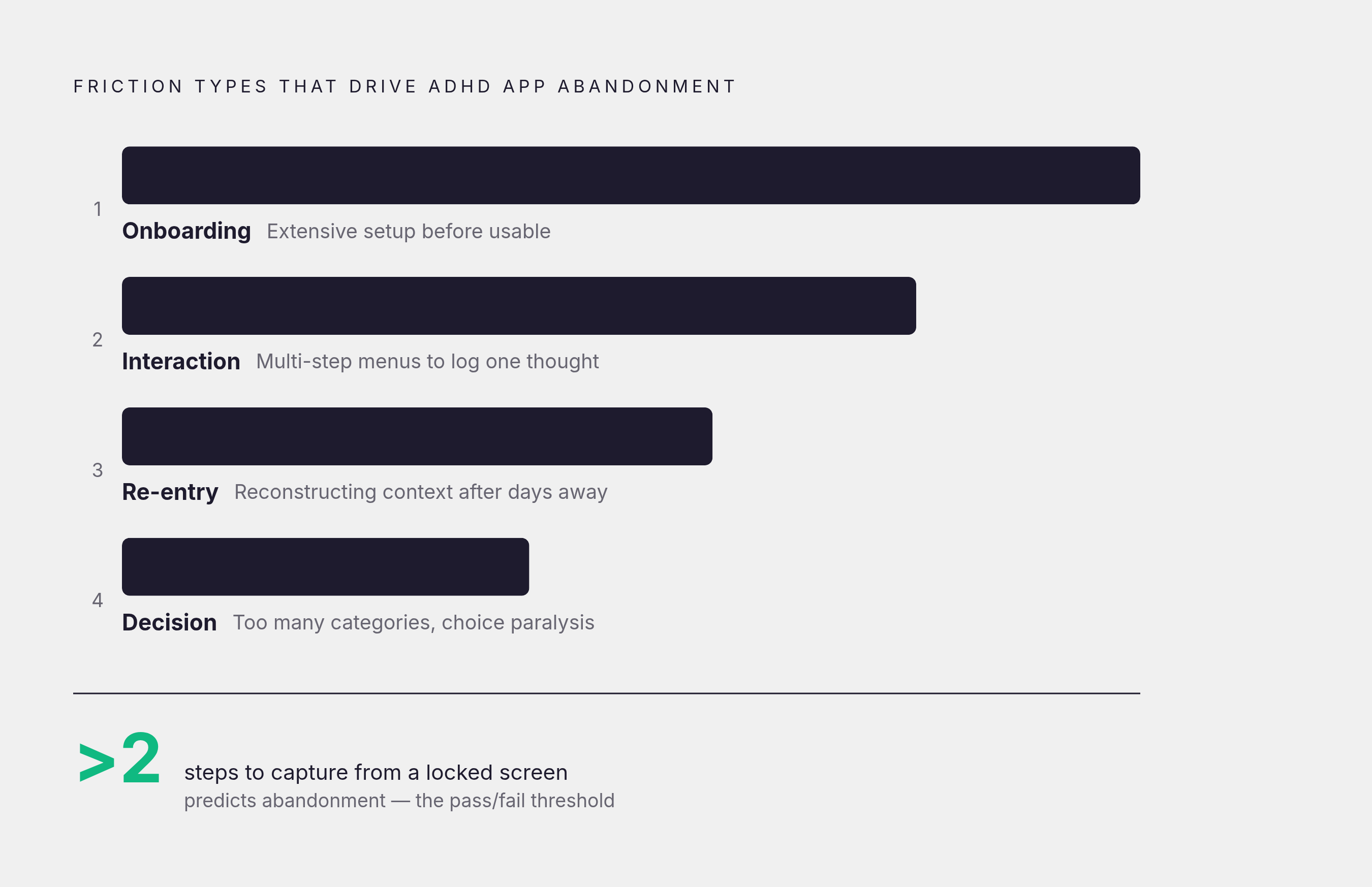
Friction clusters into roughly four types. Onboarding friction is the most visible: extensive setup sequences or configuration requirements that demand significant investment before the app is even usable. Interaction friction is subtler but more consistently damaging, requiring typing, multi-step menus, or sequential decisions to log a single thought. Re-entry friction is what happens when you open an app after a few days away and have to reconstruct context rather than pick up where you left off. Decision friction is perhaps the least discussed: too many categories or customization paths trigger avoidance, because choice overload under cognitive load produces paralysis.
Voice-first interaction is a direct structural response to interaction friction. Speaking is faster and lower-effort than typing, particularly mid-task, and it removes the decision point about where to file something before the thought is even captured. The environmental design principle applies cleanly here: the best tool removes barriers rather than adding structure the user is then responsible for maintaining.
A practical test: how many steps does it take to capture a thought from a locked screen? If the answer exceeds two, the app will be skipped during the moments it's most needed. That is a pattern, not a prediction.
How Dopamine-Compatible Design Separates ADHD Tools from Generic Ones
Games work for ADHD brains at rates that productivity apps rarely match, and the reason is not that games are more fun in some general sense. It is that games provide immediate, continuous, variable feedback. Every action produces a visible consequence in real time. A 2020 review in Frontiers in Psychology found that gamification significantly increases motivation, learning, and persistence, with particular effect among people who struggle with traditional incentive structures. This is not a design preference. It is a neurological match.
What dopamine-compatible design actually looks like in practice requires some unpacking, because the term gets misused constantly. Immediate feedback means visible confirmation the moment a task is completed, not a checkbox that disappears into a list. Progress visibility means streaks, experience points, or visual indicators that make incremental movement tangible in the moment. Variable rewards — unpredictable positive feedback rather than strictly predictable outcomes — sustain engagement longer because the dopamine response is stronger to uncertain positive outcomes than to guaranteed ones. Micro-wins matter independently: a 2021 study in Cognitive Therapy and Research found that breaking tasks into micro-goals improved focus duration meaningfully over four weeks, suggesting that task decomposition is not organizational tidiness but a direct intervention on attention maintenance.
The distinction worth scrutinizing is between gamification as decoration and gamification as architecture. Badges that appear once, are noted briefly, and never surface again are decoration. A reward system woven into every core interaction, where progress is legible in real time, is architecture. The former is a feature bolted onto a productivity app. The latter is a different theory of what a productivity app should be.
The clearest institutional signal in this space came in June 2024, when EndeavorOTC became the first FDA-cleared digital treatment for adult ADHD. It is a video game — the most serious validation yet produced for game-based mechanisms as a legitimate therapeutic tool, not a supplementary engagement strategy.
The evaluative question for any app: does it make progress feel real in the moment, or does it only acknowledge completion of goals that are days or weeks away?
Whether the App Actually Structures Executive Function or Just Reminds You to Use Yours
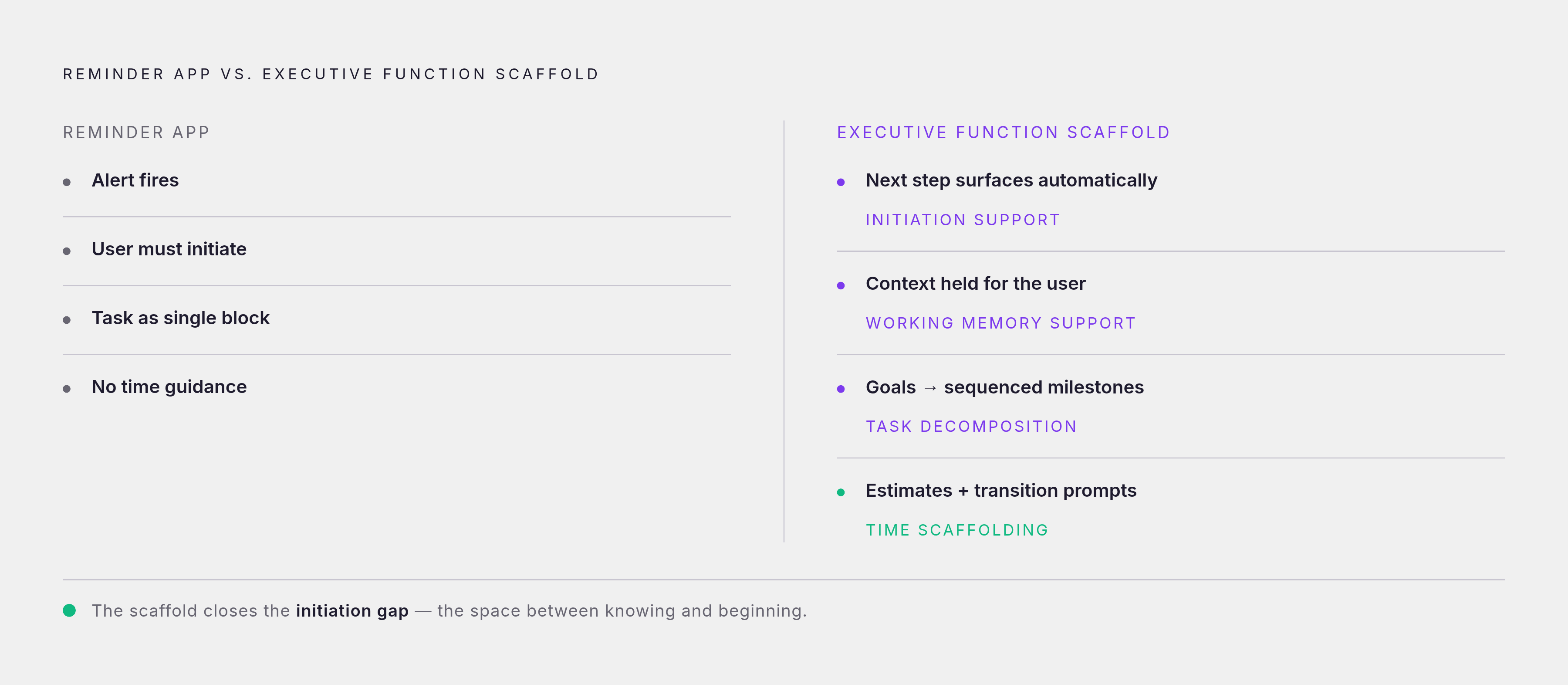
This is the distinction that most productivity app marketing actively obscures. A reminder app assumes that once reminded, the user can initiate. An executive function scaffold assumes that initiation itself is the problem and designs around it accordingly. These are not variations on the same tool. They are different theories of what the user needs, and conflating them is how people end up blaming themselves for failing to use something that was never designed for them.
Substantive executive function support has identifiable characteristics. Working memory support means the app holds context on behalf of the user: goals, next steps, and relevant history surfaced automatically, not buried in menus requiring navigation. Task decomposition means large goals broken into specific, sequenced milestones, not left as single line items; overwhelming goals are a primary driver of ADHD paralysis, and chunking is a documented cognitive intervention. Time scaffolding means the app builds time estimates and transition prompts into the workflow rather than leaving those calculations to the user, which directly compensates for time blindness. Initiation support means structured prompts or guided check-ins that reduce the cold-start problem — the gap between knowing what to do and being able to begin.
The failure mode in most productivity apps is that they surface the full task list and leave prioritization, sequencing, and initiation entirely to the user. Those are precisely the functions that executive dysfunction impairs most reliably. As Josh Dolin has noted in writing about ADHD and habit formation, building new routines requires executive function including organization, memory, and impulse control, which ADHD makes uniquely challenging. An app that builds the scaffold externally removes the dependency on those impaired functions. An app that assumes them will be used inconsistently at best and abandoned at worst.
Habit stacking — attaching new behaviors to existing triggers so the brain doesn't have to generate new initiation signals — can be encoded into an app's design or left to chance. A practical test: does the app tell you what to do next, or does it wait for you to tell it?
The Consistency Traps That Cause Even Well-Designed Apps to Stop Working Over Time
An app can pass every test above and still end up in the graveyard. The mechanism is predictable: novelty. Dopamine responds strongly to new stimuli, and initial engagement with a well-designed app rides partly on that spike. When novelty fades, what remains has to be strong enough to sustain use without it. Most apps are designed without that transition in mind, and I'd argue most users aren't either.
The most common first move, as Neural Revolution has identified in writing about ADHD routines, is overbuilding at the start. Enabling every feature, constructing elaborate category taxonomies, committing to ten habits on day one: these feel motivating during setup and become barriers by week two. A system with too many components fights against the executive function it was supposed to support. The same drive for comprehensiveness that makes initial configuration satisfying is exactly what produces abandonment.
There is also a physiological reality that app design rarely accounts for. A meta-analysis published in Nature and Science of Sleep found that more than 75% of individuals with ADHD experience sleep problems, including delayed sleep phase. Morning routines built into apps, or any routine with a fixed-time trigger, need to account for variable start times. An app that assumes a 7 a.m. anchor and treats deviation as failure will generate shame rather than support.
Shame is a specific design hazard, and it deserves to be treated as one. Apps that frame missed streaks or incomplete logs as failures rather than as data points push ADHD users toward avoidance. The tool becomes something to hide from, which accelerates abandonment precisely because opening the app now means confronting evidence of inadequacy. Sustainable app design tolerates gaps without dramatizing them, invites return without penalty, and evolves with the user's changing context rather than requiring manual reconfiguration every time life shifts.
Two or three anchor behaviors supported well, as Neural Revolution argues, will outlast a ten-step system that has no margin for ordinary variability.
A Practical Framework for Evaluating Any ADHD App Before Committing to It
Three questions matter more than anything a feature comparison chart will tell you.
First: does the app reduce friction or add it? Count the steps required to complete the app's most common action, capturing a task or logging a thought, from wherever you are when you need to. More than two steps is a meaningful risk factor.
Second: does the app create immediate reward, or defer it? Look for real-time feedback mechanisms woven into core interactions, not completion logging that surfaces value only after extended use.
Third: does the app do the executive function work, or ask you to do it? Test this by examining whether the app surfaces what's next for you or waits for you to navigate to it.
Secondary questions are still worth asking. Can you use the app in under 60 seconds during a transition between tasks? What happens after a missed day: does the design invite return or confront you with failure? Is there a path from a vague goal to a specific, sequenced next action within the app, or does that translation have to happen in your head before you can use the tool at all?
The category mistake to avoid is comparing apps on interface design, feature count, or price before establishing whether the core interaction model is ADHD-compatible. Research cited by Brain.fm based on WHO data found that workers with ADHD experience an average of 22 excess days of lost productivity per year compared to peers without the condition. The cost of using the wrong tool is not aesthetic. It is real, cumulative, and measurable.
The right app is not the most popular one, nor the most comprehensive. It is the one whose design reflects an accurate model of how your particular brain actually functions. Start deliberately small: identify one friction point the app might solve, test it at minimal complexity for two weeks, and only then decide whether to expand. The urge to build the full system on day one feels like diligence. In practice, it's usually just a faster route to the graveyard.